tibbet
Teilnehmer
Hi
Hope you excuse me writing in english.
Working on installing IMFSoft.com Universal Ignition with Hall alt. optical pickup.
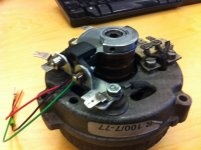
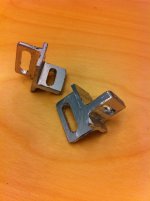
Custom made Hall Pickup mount and indicator disk. Right pict new pickup mount.
Got a problem with the Hall pickup so I would like to use the optical pickup.
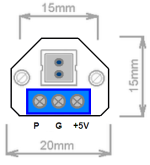
Anyone used this pickup would like know where the 3 wires should go into the connector. Couldn't find no marks on the connector socket or PC.
Guessed where the wires should go but before connect the unit I would like to be shure.
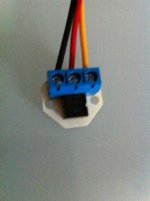

Mailed IMFSoft for advise but have to wait some days as it's eastern holliday.
Appreciate any tips.
Hope you excuse me writing in english.
Working on installing IMFSoft.com Universal Ignition with Hall alt. optical pickup.
Custom made Hall Pickup mount and indicator disk. Right pict new pickup mount.
Got a problem with the Hall pickup so I would like to use the optical pickup.
Anyone used this pickup would like know where the 3 wires should go into the connector. Couldn't find no marks on the connector socket or PC.
Guessed where the wires should go but before connect the unit I would like to be shure.
Mailed IMFSoft for advise but have to wait some days as it's eastern holliday.
Appreciate any tips.
Zuletzt bearbeitet: